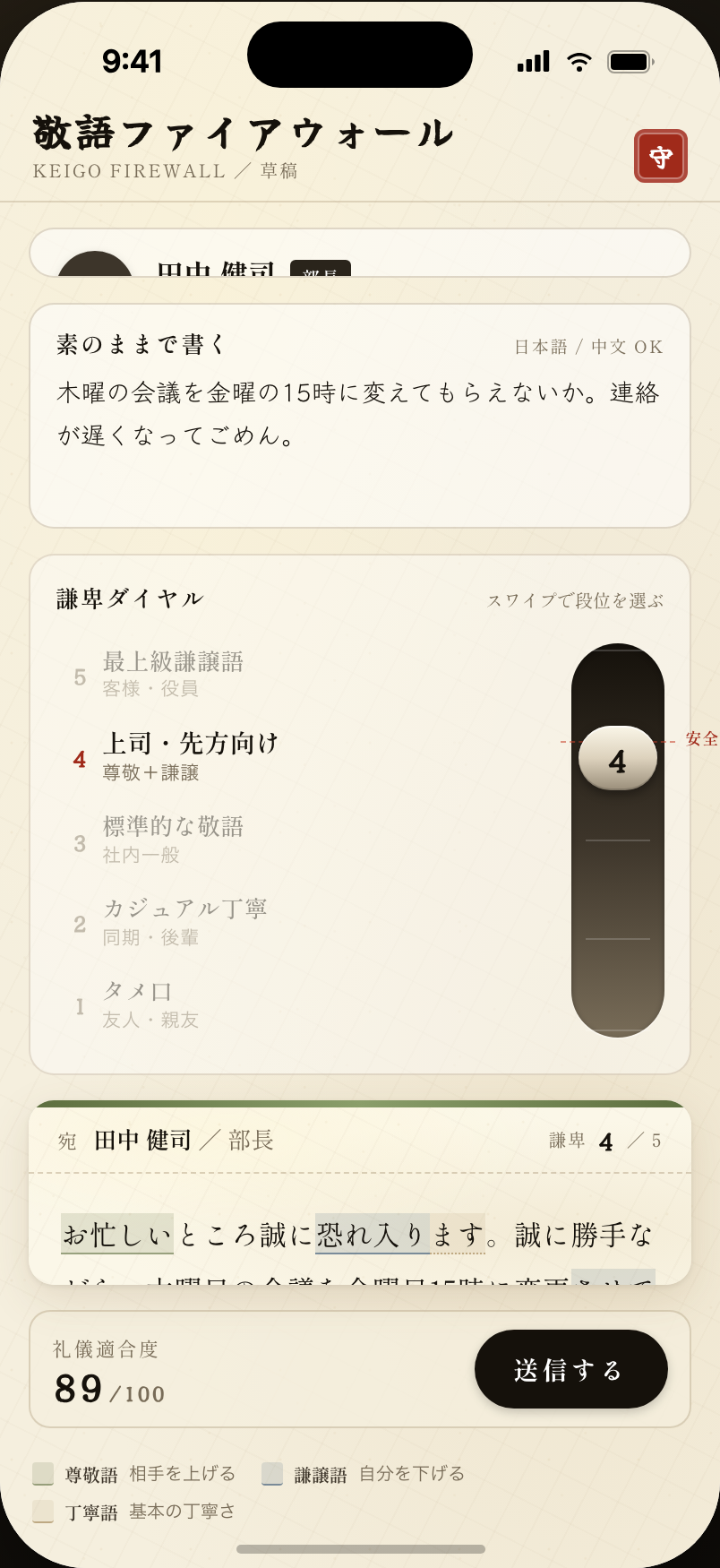
How it works today
It is your first month at a Japanese company. You need to email the 部長 (buchō, division head) to reschedule a meeting. You know the three layers of 敬語 exist in theory: 尊敬語, 謙譲語, and 丁寧語. In practice you stare at the draft for thirty minutes, rewrite the opening four times, and still are not sure whether to use いただく, くださる, or 頂戴する.
Use a register that is too light for a 部長 and nobody may correct you out loud. They may simply notice. That is what makes the draft harder than the message itself.
How it works
You type what you actually mean, in casual Japanese or plain English: “Can we move Thursday’s meeting to Friday 3pm? Sorry for the short notice.” You set the recipient, for example To: 部長, and choose a formality level from 1 to 5. The AI rewrites the whole email in the right register. At level 3 for a 部長, it comes back something like:
お忙しいところ恐れ入ります。誠に勝手ながら、木曜日の会議を金曜日 15 時に変更させていただくことは可能でございますでしょうか。直前のご連絡となり、深くお詫び申し上げます。
Move the level up to 5 and it adds deeper 謙譲語 forms. Move it down to 1 and it gives you something you might send to a same-year colleague.
The moment it becomes clear
The foreign intern sends a message that reads natural in the company context. The 部長 replies warmly within ten minutes. The intern did not have to master the difference between いただく and 頂戴する before sending the email.